
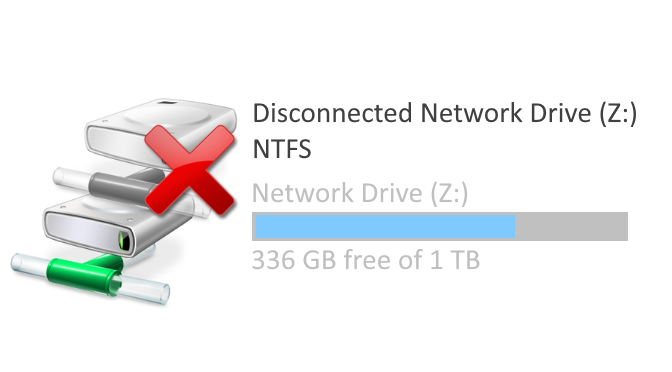
Network issues after update, no access to network drives after Winodws update.
Windows 10 clients no longer display network drives correctly in Windows Explorer. Access to NAS and servers with SMBv1 shares are no longer possible. This after feature update for Windows 10 version 2004 is installed.
Access to NAS and server interrupted after Update Build 19041.508 (2004)
Symptom
Network drives to Windows shares are no longer accessible after the feature update May 2020 was downloaded. With the Windows Update 2004 Build 19041.508. Access is no longer possible for standard users to share who use the SMB 1.0/CIFS network protocol.
Cause
Microsoft has changed the behavior for the SMB version 1 network protocol with the Windows 10 feature update 2004. The SMBv1 network protocol is no longer considered secure. Microsoft’s recommendation is to stop using the outdated SMB 1.0/CIFS protocol. See also – Windows 10: Unable to access SMBv1 share
Solution
The Registry Key ProviderFlags controls the recovery of network shares they use Server Message Block (SMB) version 1 when they are stored in the registry. The registry DWORD Key ProviderFlags can be add in the registry key [HKEY_CURRENT_USER\Network\
REG ADD "HKCU\Network\i" /v "ProviderFlags" /t REG_DWORD /d "1" /f
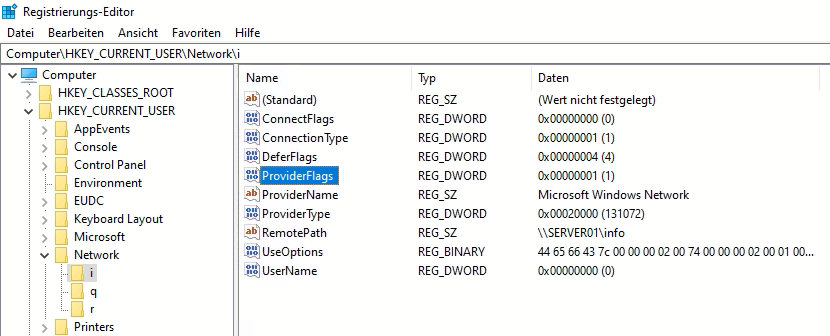
The network drive (i) is mapped to the share info on SERVER01, which uses the SMBv1 network protocol. The Key ProviderFlags is required if network drives are used that use devices with SMBv1; all network drives in the HKCU\Network branch must then be registered with the REG_DWORD ProviderFlags. The change requires a restart.
Solution: net use persistent:no
Another solution is using the /persistent:no parameter, where the network drive mapping is executed from login scripts. As by batch files on the logon server, or on a network without ADS, through a local logon script on the client. The windows network drives are created in the logon script using net use /persistent:no.
@echo off
net time \\SERVER01 /set /y
net use * /delete /y
net use i: \\SERVER01\info /persistent:no
net use j: \\SERVER01\data /persistent:no
This example deletes all network drives before they are mapped. But does not permanently store the network drives in the registry. So there is no further interruption that exists with the 2004 feature update for network drives that use network shares with use the SMBv1 network protocol.
Shutdown while press Shift Key
The computer may have to be shut down completely in order to trigger a cold start without a quick start. So that the windows update for the network drives are initialized. Press the Shift key when switching off the computer. At the same time when you click on Shutdown, a cold start takes place the next time you power on.
