Linux tail is part of the GNU Core Utilities (Coreutils), the tail command is not included in Windows, but can use in PowerShell. It is a collection of basic command line commands that come with most Linux OS.
First and foremost, tail is used to output the end of a (text) file, or to restrict the output of a Linux command to a certain area. The tail command is related to the head command and the cat and less commands. These Linux commands all serve one purpose of outputting the contents of text files.
Linux tail with PowerShell on Windows
As used on Linux tail with the -f (–follow) option to follow the update of a log file in real time, but on Windows there is no tail command. For this Windows has the PowerShell command Get-Content, to track a log file followed in real time, new lines that are written to the log file can also be displayed continuously under Windows.
PowerShell Get-Content -Wait -Tail
On Windows, the Linux tail command does not exist. For this, Windows has the PowerShell command Get-Content, with the option -Wait -Tail a log file can be followed in real time. New lines that are written to the log file can also be displayed continuously under Windows.
How to set PHP version for Apache on Debian between multiple versions.
If several PHP versions are installed on a Debian 10 and Debian 11 or Ubuntu 22.10, a PHP version can be set and activated for the system default and the Apache 2 HTTP web server.
Let’s assume that several PHP versions are installed on the Debian system. Now the active PHP version for CLI and Apache 2 web server should be changed. This tutorial shows how to switch between multiple PHP versions for Apache web server and CLI.
Enable a PHP version as default on Debian with Apache
PHP 8.2 should be set as the active PHP version for CLI and Apache 2 HTTP web server. This is done by disabling the Apache 2 modules for all other installed PHP versions and setting them from the CLI with the update-alternatives command.
Phar is a PHP extension that makes it possible to process programs or files packaged in PHAR format (PHP archive) from a compressed archive file. The archives created with the Phar PHP class are created in bzip2 and gzip compression.
For the Apache 2 web server, the corresponding module is activated with the Apache helper, by using the a2enmod command. Use a2dismod to disable a module.
a2enmod is a script that enables the specified module within the apache 2 configuration. It does this by creating symlinks within /etc/apache2/mods-enabled. Likewise, a2dismod disables a module by removing those symlinks. It is not an error to enable a module which is already enabled, or to disable one which is already disabled.
Multiple PHP mudules can be disabled in one single command.
You can show all installed PHP modules, here in abbreviated form.
a2query is a program for retrieving configuration values of Apache 2 HTTP web server. It returning feasible values even if the Apache 2 syntax validator fails.
$ a2query -m | grep php
php8.2 (enabled by site administrator)
You can also use find to call up and display the available Apache 2 PHP modules on the file system.
$ find /etc/apache2/mods-available/ -name *php*
The system-wide PHP settings you can found under /etc/php, for changes open the php.ini file in the editor of your choice.
$ vi /etc/php/8.2/apache2/php.ini
Replace the appropriate version number in the directory path.
Check active PHP version
Which PHP version is active? this you can obtain from CLI by querying the PHP version set active on the system as follows.
$ php -v
PHP 8.2.3 (cli) (built: Feb 14 2023 16:53:07) (NTS)
Copyright (c) The PHP Group
Zend Engine v4.2.3, Copyright (c) Zend Technologies
    with Zend OPcache v8.2.3, Copyright (c), by Zend Technologies
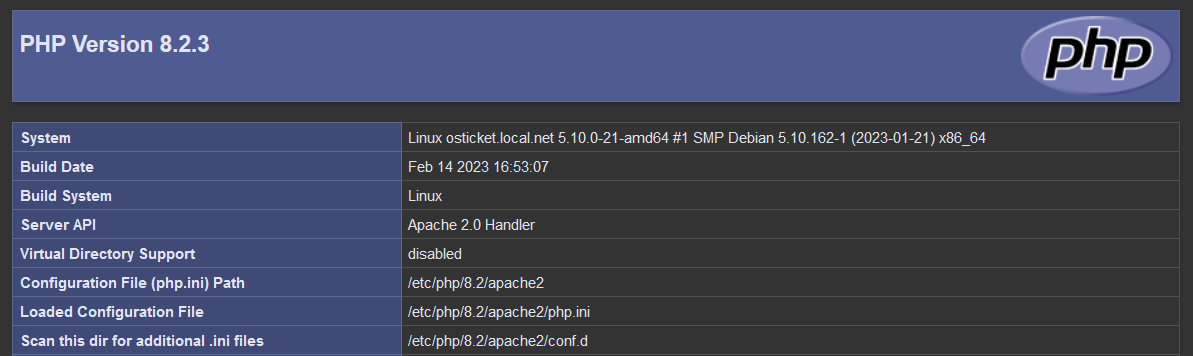
The current PHP version and modules for the Apache 2 web server are displayed by creating a php file with the following content.
<?php
phpinfo();
?>
The Apache 2 default-site has the DocumentRoot in /var/www/html, create the phpinfo.php file here, unless another DocumentRoot is chosen.
To view the current PHP version and modules for the Apache web server in the web browser: http://ip_or_fqdn/phpinfo.php
for example: http://192.168.3.2/phpinfo.php
On a production system, phpinfo.php should be removed from the DocumentRoot after the check is complete.