How to view E-Mail internet message headers in Outlook
Outlook offers a way to display the source text of the e-mail or the internet (SMTP) headers to clearly identify the origin of the e-mail. The Internet headers can also be used to analyze server delivery and encoding.
If you want to examine the SPAM status in the message header of an e-mail with Outlook, the section “X-Spam-Flag” with the X-Spam-Score value is of interest, you will notice that the X-Spam status is completely missing in the Internet headers, although these are given by Spamassassin.
View Outlook internet message headers
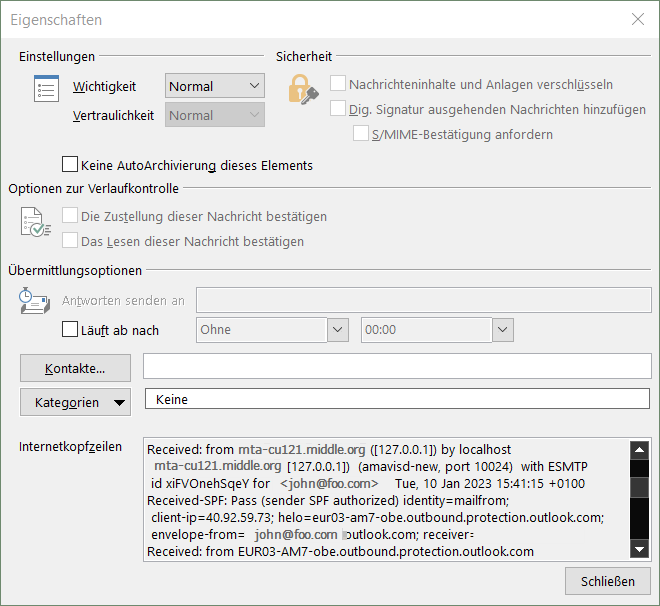
Open the e-mail and go to File -> Properties.
The X-Spam information is simply truncated by Outlook, if you examine the header with another e-mail client, for example using a webmail application, you’ll find the full unfiltered header. However, Outlook takes the X-Spam-Flag classification into account and moves the message to the Junk E-mail folder if it is received with X-Spam-Flag: YES, as long as the default setting in the Junk E-mail options has not been changed.
Track the entire unfiltered Internet Header
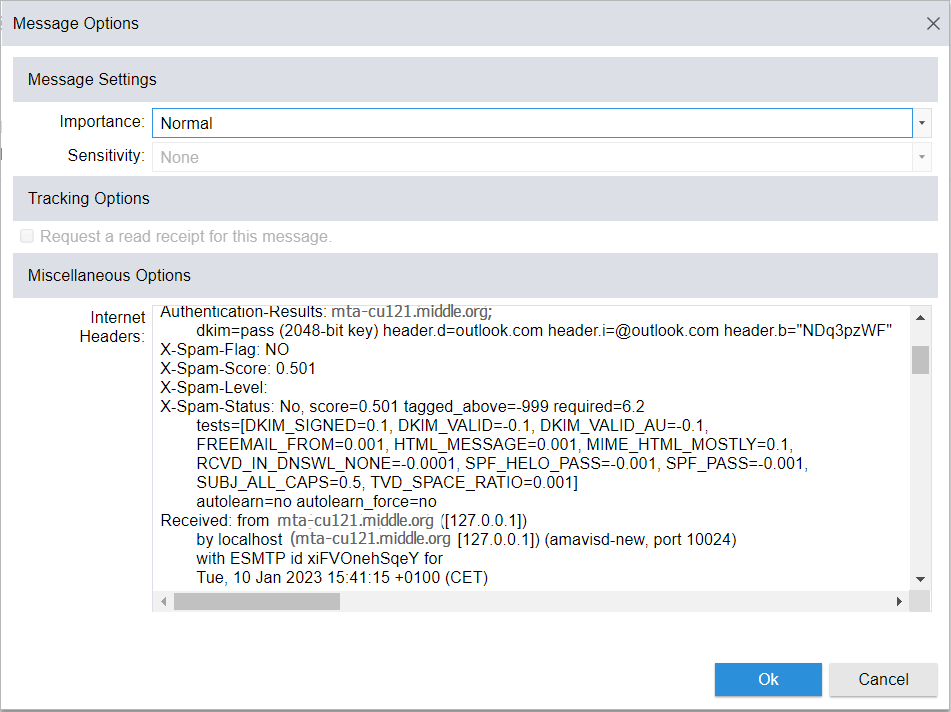
X-Spam header truncated snippet in Outlook:
Authentication results: mta-cu121.middle.org;
	dkim=pass (2048-bit key) header.d=outlook.com header.i=@outlook.com header.b="NDq3pzWF"
X-Spam-Flag: NO
X-Spam Score: 0.501
X-Spam Level:
X-Spam Status: No, score=0.501 tagged_above=-999 required=6.2
	tests=[DKIM_SIGNED=0.1, DKIM_VALID=-0.1, DKIM_VALID_AU=-0.1,
	FREEMAIL_FROM=0.001, HTML_MESSAGE=0.001, MIME_HTML_MOSTLY=0.1,
	RCVD_IN_DNSWL_NONE=-0.0001, SPF_HELO_PASS=-0.001, SPF_PASS=-0.001,
	SUBJ_ALL_CAPS=0.5, TVD_SPACE_RATIO=0.001]
	autolearn=no autolearn_force=no
Received: from mta-cu121.middle.org ([127.0.0.1])
	by localhost (mta-cu121.middle.org [127.0.0.1]) (amavisd-new, port 10024)
	with ESMTP id xiFVOnehSqeY for <john@foo.com>;
	Tue, 10 Jan 2023 15:41:15 +0100 (CET)
we have noticed in outlook that e-mails are filtered upon received for e-mails marked with the X-Spam flag and if the spam e-mail was sent from an office 365 account, usually from sender domain mail.protection.outlook.com
Internet message headers in new Outlook
An email message internet header provides a list of technical details about the message, such as who sent it. The software used to compose it, and the email servers that it passed through on its way to the recipient. Most of the time, only an administrator will need to view internet headers for a message.
Some senders use spoofing to disguise their email address. By checking the header, you can find out if the email address is different than. It appears, and add it to your blocked senders list.
View message headers in new Outlook
Select More actions button (three dot menu) at the top of the message window and select View > View message details.
Find the sender’s address
Scroll down in the Message details until you find the From field.
Highlight the email address enclosed within < > and right-click to Copy.
Realtime Blackhole Lists (RBL) and Domain Name System BlockList (DNSBL) are publicly available lists on the Internet, with addresses and servers that have recently been the source of malicious and unwanted or suspicious activity, such as the sending of spam or phishing e-mails.
Prevent SPAM and phishing emails
Blacklists were created to prevent the flood of unwanted emails. IP addresses of suspicious mail senders reported by spamtraps are collected on blacklists. E-mail servers compare received e-mails to see whether the sender is on a blacklist. If the classification is positive, the e-mail is moved directly to the Junk E-mail folder or not accepted at all and rejected by the server.
The widely used open-source spam filters SpamAssassin from the Apache project, and the Postfix MTA (Mail Transfer Agent) for Unix and Unix derivatives, are particularly suitable for integration. This tutorial deals with the integration of Realtime Blackhole Lists (RBL) and DNS Based Realtime Blocklists (DNSBL) using Postfix.
How to use DNS-based Blackhole List on Postfix
As the name suggests, querying a DNSBL is, from a technical point of view, a DNS query. DNS-based blackhole lists are queried in near real time, DNSBLs are adding in the/etc/postfix/main.cffile usually under smtpd_recipient_restrictions, as shown in the example.
There are usually many more rules for checking the criteria, this tutorial will show how to use DNSBL query.
A right-hand side blacklist (RHSBL) is a listing that contains the domain names of spammers, which mail servers can be programmed to reject. RHSBL functions the same way as a domain name system blacklist (DNSBL) with one important distinction: RHSBLs include domain names rather than IP addresses.
The sooner the better – the verification is done before queuing, with the guidelines be carried out undersmtpd_client_restrictions
With this check, the DNSBL query takes place before writing to the mail spool, and a NOQUEUE: reject: is returned. The advantage comes from the fact that the system resources are used less.
As after any change, Postfix must be reloaded.
$ postfix reload
SBL DNSBL Black List testing
The Black List test record 127.0.0.2 is the loopback address of the SBL DNS zone like “sbl.spamhaus.org” used for testing SBL configuration on mailservers. It is also listed in most other DNSBL systems as the standard testing address for those zones, as recommended by RFC5782 and RFC6471.
Note. If you are using a free “open DNS resolver” service such as the Google Public DNS (8.8.8.8) in most cases they will return a “not listed” (NXDOMAIN) reply from Spamhaus’ public DNSBL servers. It is recommend using your own DNS servers when doing DNSBL queries to Spamhaus.
The DNSBL query for the dummy record returns 127.0.0.2 if the IP is listed as a spam source in the database. To check a domain query, for example 0spam.org, a lookup to bl.0spam.org can by used, depending on the respective DNSBL.
$ host 2.0.0.127.bl.0spam.org
The query with reverse loopback address of bl.0spam.org.
$ host -tTXT 2.0.0.127.bl.0spam.org
Querying the TXT record from 0spam.org outputs the following.
2.0.0.127.bl.0spam.org descriptive text "This listings is for RFC Compliance. See RFC 5782. For support and listing removal go to https://0spam.org Possible Values: 127.0.0.1(General Listings), 127.0.0.2(depreciated) 127.0.0.3(can-spam violators) 127.0.0.4(non RFC compliant) 127.0.0.5(repeat of" "fender) 127.0.0.6(bouncing email to the wrong server) 127.0.0.7(open relay) 127.0.0.8(bouncing spoofed emails) 127.0.0.9(fraud/scam, malware or illegal/abusive content)"
Some DNSBLs provide useful information, such as multiple loopback addresses able to testing queries.
$ dig +short TXT 2.0.0.127.hostkarma.junkemailfilter.com @8.8.8.8
"Black listed at hostkarma http://ipadmin.junkemailfilter.com/remove.php?ip=127.0.0.2"
"Black listed (authentication hacker) at hostkarma http://ipadmin.junkemailfilter.com/remove.php?ip=127.0.0.2"
"White listed 127.0.0.2 See http://wiki.junkemailfilter.com/index.php/Spam_DNS_Lists"
"Yellow listed 127.0.0.2 See http://wiki.junkemailfilter.com/index.php/Spam_DNS_Lists"

$ dig +short ANY 2.0.0.127.multi.surbl.org
127.0.0.254
"wild.surbl.org permanent test point"

$ dig +short ANY 2.0.0.127.psbl.surriel.com
"Listed in PSBL, see http://psbl.org/listing?ip=127.0.0.2"
127.0.0.2

$ dig +short ANY 2.0.0.127.dnsbl.sorbs.net
127.0.0.10
"Dynamic IP Addresses See: http://www.sorbs.net/lookup.shtml?127.0.0.2"
127.0.0.5
"Open SMTP Relay See: http://www.sorbs.net/lookup.shtml?127.0.0.2"
127.0.0.7
"Exploitable Server See: http://www.sorbs.net/lookup.shtml?127.0.0.2"
127.0.0.2
"HTTP Proxy See: http://www.sorbs.net/lookup.shtml?127.0.0.2"
127.0.0.3
"SOCKS Proxy See: http://www.sorbs.net/lookup.shtml?127.0.0.2"

$ dig +short ANY 2.0.0.127.bl.nordspam.com
"RFC5782 TEST-record."
127.0.0.2

$ dig +short ANY 2.0.0.127.truncate.gbudb.net
127.0.0.2
"Test Record"
queries can be narrowed down, for example to only get the RBL addresses from U.S. by using usa.bl.blocklist.de
$ host -t any 2.0.0.127.usa.bl.blocklist.de
2.0.0.127.usa.bl.blocklist.de has address 127.0.0.2
2.0.0.127.usa.bl.blocklist.de descriptive text "Infected System, see http://www.blocklist.de/en/view.html?ip=127.0.0.2"
The zone bruteforcelogin.bl.blocklist.de queries IPs that attacks Joomla, WordPress and other web logins via brute force attacks, or ftp.bl.blocklist.de queries only IPs from which FTP attacks have been recorded. The individual RBL zones with used return codes and guidelines can be found on the websites of the DNSBL providers. Whitelists such as DNSWL are also used to avoid false positives.
DNS-based Blackhole List (DNSBL) not allow exceed 1,000 requests per second, if the requests exceed 1,000 per second, the rsync method should be applied.
IP-based Domain-based Combined List (SBL, SBLCSS, XBL, PBL)
CBL
cbl.abuseat.org
IP-based
Spamcop
spamcop.org
IP-based
SwiNOG
swinog.ch
IP-based
SURBL
surbl.org
Domain-based
SORBS
sorbs.net
IP-based
URIBL
uribl.com
Domain-based
Mailspike
mailspike.org
Combined List
Blocklist.de
blocklist.de
IP-based
Barracudacentral
barracudacentral.org
IP-based
UCEPROTECT
www.uceprotect.net
IP-based
JunkEmailFilter
junkemailfilter.com
IP-based Domain-based
0spam
0spam.org
IP-based
NordSpam
nordspam.com
IP-based
GBUdb
gbudb.com
IP-based
Conclusion
DNSBLs are generally the first line of defense against spam. The DNSLB providers pursue their own requirements for criteria and quality, the results must be determined in order to make the choice of DNSBLs so that they meet the desired requirements and criteria. Most postmasters rely on real-time DNS-based blocklists (DNSBL). Messages from these are not even accepted or the information from a listing is included in the spam scoring. These methods are also technically described by the IETF: https://tools.ietf.org/html/rfc5782

 Postfix main configuration