Privacy Compliance: Turn off cloud provided spell checking
The browsers on the Chromium rendering have a basic, purely local spelling aid and extended spell checking with the help of online services. The texts entered in web apps are transferred to the cloud. This can be disabled interactively or using Group Policy.
More and more modern applications are web apps, including those that process sensitive data. In this case, companies usually do not want them to enter the cloud uncontrollably for spelling correction.
Google Chrome defaults to basic local spell checking, while Microsoft Edge defaults to Microsoft Editor. This not only initiates the spell checking in the cloud, but also a grammar check and suggests improvements.
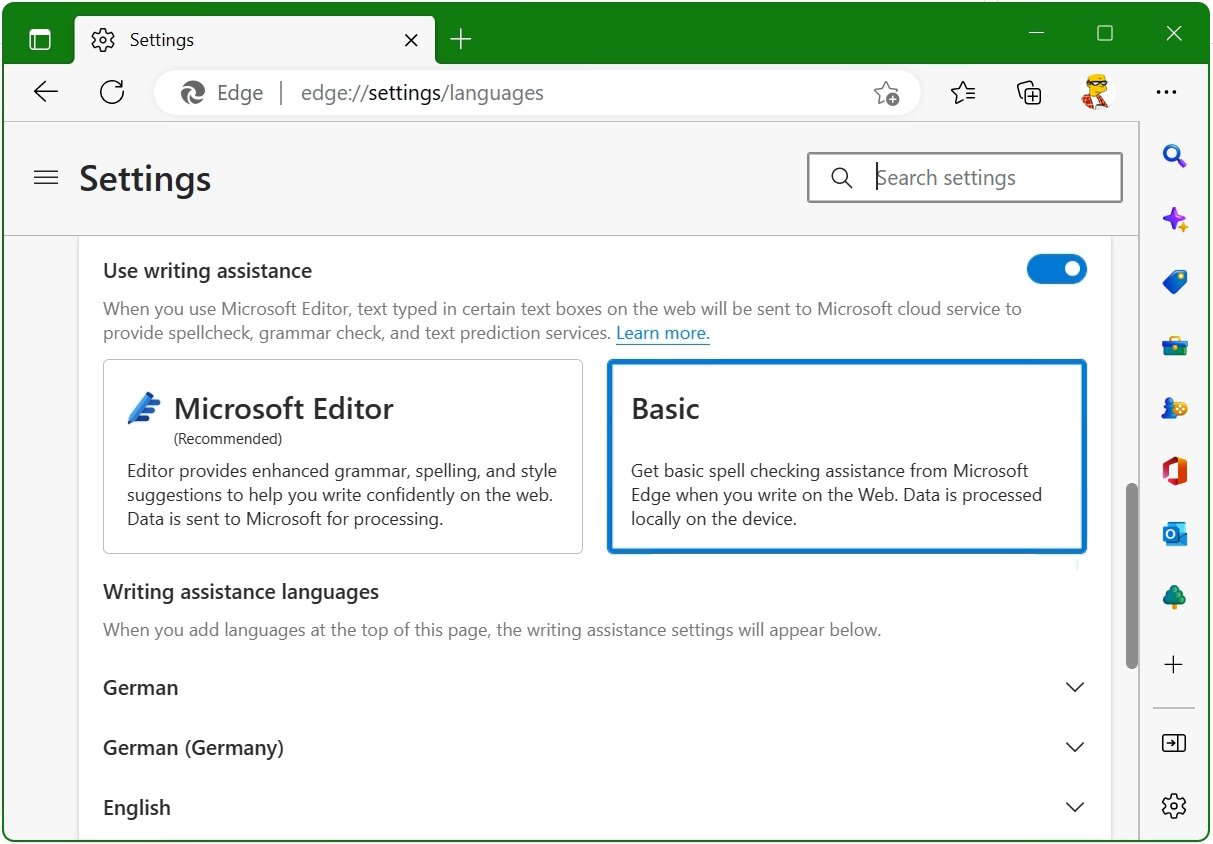
Microsoft Edge Basic spell checking
The setting can be changed with: edge://settings/languages – Use writing assistance Set to Basic.
Microsoft Edge: Settings Use writing assistance
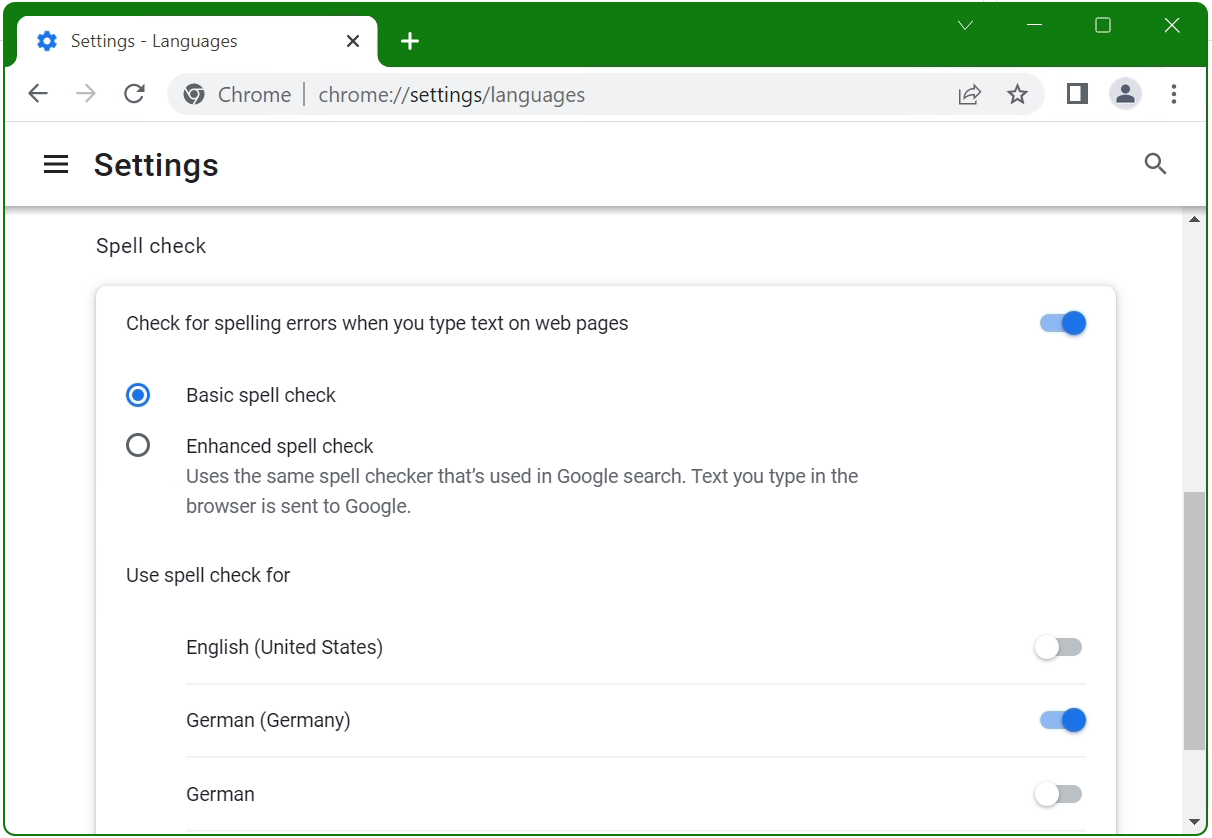
Google Chrome Basic spell check
In Chrome, as expected, the corresponding option is under Settings – Languages chrome://settings/languages under Spell check there Select Basic spell check .
Google Chrome: Settings Spell check Basic spell check
If you want to do without the use of spelling correction in the cloud, then in addition to activating the local mode, it should also be prevented that the users can not change this configuration again. Both browsers offer a setting for this in Group Policy.
For Microsoft Edge, under Computer Configuration > Policies > Administrative Templates, this is > Microsoft Edge and the spell checker provided by Microsoft Editor. Disabling them prevents writing assistance in the cloud.
Google Chrome disable the cloud provided spell check under Computer Configuration > Administrative Templates policies > Google > Google Chrome and Spell Check Web Service set to disable.
This post shows how Kopano users current store size is by displayed in the console. Admins who manage Kopano Groupware servers, they need to know what users are causing storage quotas.
How to show current Kopano store size of a user
Let’s say we want to know how the current storage usage of a Kopano user in an organization looks like. Usually we will run this command:
$ kopano-admin --details kate@middleton.org
This will show us all the details about the user.
Object id:              5
Extern id:              \313\332\306\30\336\325G)\263\356\275;s\324\237z
Username:               kate@middleton.org
Fullname:               Kate Middleton
Emailaddress:           kate@middleton.org
Active:                 yes
Administrator:          yes
Address book:           Visible to current user
Auto-accept meeting req:no
MDB provider:           KOPANO_STORE_DELEGATE_GUID
Store GUID:             0E79B76316F0491F9A8C4BFE1C1F1592
Out Of Office:          disabled
Server version:         8.7.25
Mapped properties:
        PR_EC_ENABLED_FEATURES  mobile; outlook; webapp
        PR_EC_DISABLED_FEATURES imap; pop3
Current user store quota settings:
 Quota overrides:       no
 Warning level:         1024.00 MB
 Soft level:            2048.00 MB
 Hard level:            3072.00 MB
Current store size:     231.10 MB
Groups (1):
        Everyone
Show current Kopano store size of all users
If there are more than a couple of users, another adequate solution must be found. It makes sense to create a simple bash script in which we run kopano-admin in a for loop:
#!/bin/bash
for user in $(kopano-admin -l | sed -n 5,1000p | cut -f 2 | sort)
do
    kopano-admin --details $user | grep -E 'Emailaddress|Current store size|Last logon'
done
When use Kopano in a multi-tenancy environment, then the company sections must be processed, e.g. with the query and variable assignment:
The result shows us all the companies listed in a usable format, right as an option in the next commands.
Finally, the next for loops show the current store size of all users in each multi-tenancy company:
#!/bin/bash
for comp in $(kopano-admin --list-companies | sed -n 4,1000p | cut -f 2)
do
    echo "Company $comp"
    for user in $(kopano-admin -l -I "$comp" | sed -n 5,1000p | cut -f 2)
    do
        kopano-admin -l --details "$user" | grep -E 'Emailaddress|Current store size'
    done
done
As a pattern, grep with -E option can add further patterns, desired patterns can be inserted separately with pipe, e.g. Current user store quota settings like Warning level and Soft level or Hard level.
Company middleton.org
Emailaddress:           kate@middleton.org
Current store size:     231.10 MB
Company dukedom.org
Emailaddress:           charles@dukedom.org
Current store size:     694.71 MB
Emailaddress:           meghan@ducedom.org
Current store size:     1195.14 MB
The output of a multi-tenancy server looks something like this.
in additions
To get just an overview, the --user-count option gives the output.
$ kopano-admin --user-count -v -v -v -v -v -v
[debug  ] Initializing provider "Kopano Directory Service"
[debug  ] Initializing provider "Private Folders"
[debug  ] Initializing provider "Public Folders"
User counts:
                        Allowed         Used    Available
        --------------------------------------------------------
        Active          no limit        1034    -
        Non-active      no limit        17      -
          Users                         0
          Rooms                         12
          Equipment                     2
        Total                           1065
Finally a very useful command is kopano-stats – they Dump kopano statistics tables, try it now.
$ kopano-stats --top
The output may look something like this.
Last update: Wed Aug  9 15:58:45 2023 (1.0s since last)
Sess: 114   Sess grp: 39      Users: 18   Hosts: 1    CPU: 1%   QLen: 0  QAge: 0.000 RTT: 0 ms
SQL/s SEL:    0 UPD:   0 INS:   0 DEL:   0        Threads(idle): 0(8)      MWOPS: 0  MROPS: 0         SOAP calls: 12

VERSION USERID                   IP/PID          APP                 TIME    CPUTIME CPU    NREQ   STAT TASK
8.7.0   SYSTEM                   14579           stats/8.7.0(kopano- 0:00    0:00    1      7      P    tableQueryRows
8.7.0   SYSTEM                   642             spooler:system/8.7. 0:00    0:00    0      0
8.7.0   SYSTEM                   642             spooler:system/8.7. 0:09    0:18    0      0
8.7.0   think@unblog.net                         Android-SAMSUNG-SM- 0:00    0:00    0      0
8.7.0   kate.middleton@foo.org                   Outlook-iOS-Android 0:00    0:00    0      0
8.7.0   prince.william@foo.org                   Outlook/16.0 (16.0. 0:00    0:00    0      0